
Deploying on AWS documentation
Batch-embed a corpus with SageMaker asynchronous inference
Batch-embed a corpus with SageMaker asynchronous inference
Last updated 2026-07-21
What asynchronous inference is
Most inference is synchronous: a client opens a connection, sends a request, waits while the model runs, and reads the response on the same connection. That works well for interactive traffic, but it struggles when the work is slow, the payloads are large, or requests arrive in unpredictable bursts. The caller has to hold a connection open for the whole run, and the endpoint has to be sized for peak load even while it sits idle the rest of the time.
Asynchronous inference decouples the request from the result. The client uploads the payload to object storage (S3) and sends the endpoint a pointer to it. The endpoint puts the request on an internal queue, processes it when capacity is available, and writes the result back to S3. The client picks the result up later by polling S3, or by reacting to a success/error notification.
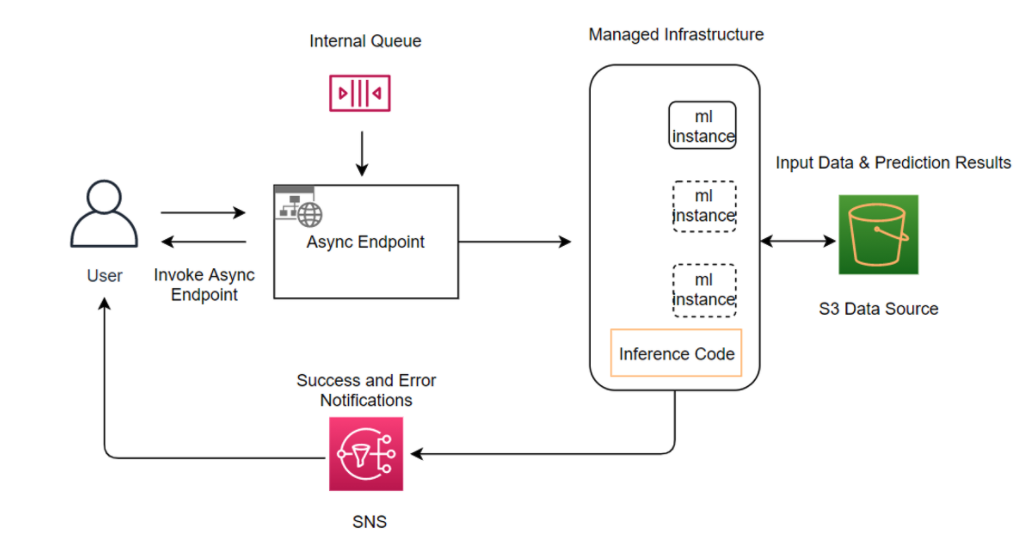
That indirection is what makes the pattern useful:
- Large payloads, long runtimes. Inputs are read from S3, not from a size-capped HTTP body, and there is no client connection to time out.
- Bursty, queue-shaped traffic. Requests accumulate in the queue and drain at the endpoint’s own pace, instead of every spike forcing an immediate scale-out.
- Scale to zero. When the queue is empty the endpoint can run zero instances and cost nothing, then wake up when new requests land.
The cost is latency: you trade an immediate answer for throughput and elasticity. So asynchronous inference is for offline and background work, not the interactive request path.
The use case we picked
To keep things concrete, this tutorial uses asynchronous inference to embed a text corpus for semantic search. Embedding a corpus is a textbook fit: it is a large, one-off batch that runs whenever the content changes, and nobody is waiting on any single vector. (Embedding the user’s live query is the opposite shape — small and latency-sensitive — and belongs on a small real-time endpoint. This notebook is only the offline half.)
The corpus is sentence-transformers/natural-questions:
real Google search queries paired with the Wikipedia passages that answer
them. We embed the passages through an asynchronous endpoint, then embed a
held-out query the same way and check that its matching passage ranks near
the top. The embedding model is served with Text Embeddings Inference (TEI),
Hugging Face’s container for embedding models.
References:
Prerequisites
Run the next cell before importing the SDK. It installs the SageMaker Python
SDK and datasets into the active kernel.
You also need an existing SageMaker execution role with access to SageMaker, S3, CloudWatch, Application Auto Scaling, and the ECR repository that hosts the selected serving DLC.
%pip install "sagemaker>=3.0.0" datasets --upgrade --quietimport datetime as dt
import json
import math
import os
import time
import uuid
from urllib.parse import urlparse
import boto3
from botocore.exceptions import ClientError
from datasets import load_dataset
from sagemaker.core import image_uris
from sagemaker.core.helper.session_helper import Session, get_execution_role
from sagemaker.core.inference_config import AsyncInferenceConfig
from sagemaker.serve import ModelBuilder, ModelServer
from sagemaker.serve.builder.schema_builder import SchemaBuilderThe corpus and the embedding model
Each record in sentence-transformers/natural-questions is a search query paired with a Wikipedia passage that answers it. We embed
the passages to build the search index and keep the queries to test retrieval
afterwards. The next cell loads a small slice; raise DATASET_SIZE to index
more.
The embedding model is BAAI/bge-small-en-v1.5, which produces
384-dimensional vectors and runs on a CPU instance. To use a different model,
set HF_MODEL_ID and set EMBEDDING_DIM to its output dimension.
PROJECT = "hf-async-rag"
RUN_ID = dt.datetime.now(dt.timezone.utc).strftime("%Y%m%d%H%M%S")

DATASET_ID = "sentence-transformers/natural-questions"
DATASET_SIZE = int(os.getenv("DATASET_SIZE", "96"))
TEXTS_PER_INVOCATION = int(os.getenv("TEXTS_PER_INVOCATION", "8"))
MAX_CONTEXT_CHARS = int(os.getenv("MAX_CONTEXT_CHARS", "1200"))

MODEL_ID = os.getenv("HF_MODEL_ID", "BAAI/bge-small-en-v1.5")
EMBEDDING_DIM = int(os.getenv("EMBEDDING_DIM", "384"))
TEI_VERSION = os.getenv("TEI_VERSION", "1.8.2")
INSTANCE_TYPE = os.getenv("SAGEMAKER_INSTANCE_TYPE", "ml.c6i.xlarge")
ENDPOINT_NAME = os.getenv("SAGEMAKER_ENDPOINT_NAME", f"{PROJECT}-{RUN_ID}")

MAX_INSTANCE_COUNT = int(os.getenv("MAX_INSTANCE_COUNT", "4"))
BACKLOG_PER_INSTANCE_TARGET = float(os.getenv("BACKLOG_PER_INSTANCE_TARGET", "5"))
MAX_CONCURRENT_INVOCATIONS_PER_INSTANCE = int(
    os.getenv("MAX_CONCURRENT_INVOCATIONS_PER_INSTANCE", "4")
)

SUCCESS_SNS_TOPIC_ARN = os.getenv("SUCCESS_SNS_TOPIC_ARN")
ERROR_SNS_TOPIC_ARN = os.getenv("ERROR_SNS_TOPIC_ARN")
ALARM_SNS_TOPIC_ARN = os.getenv("ALARM_SNS_TOPIC_ARN")

# Keep cleanup on when running this file as a script. Set CLEANUP=false if you
# want to inspect the endpoint after the tutorial finishes.
CLEANUP = os.getenv("CLEANUP", "true").lower() not in {"0", "false", "no"}
Set up the SageMaker session
The endpoint runs under a SageMaker execution role: an IAM role that grants
access to S3, ECR, and CloudWatch. Set SAGEMAKER_EXECUTION_ROLE_ARN to the
role you want to use, or SAGEMAKER_EXECUTION_ROLE_NAME if you only have its
name. Inside SageMaker Studio or a notebook instance you can leave both unset
and the role is detected automatically.
requested_region = os.getenv("AWS_REGION") or os.getenv("AWS_DEFAULT_REGION")
boto_session = boto3.Session(region_name=requested_region) if requested_region else boto3.Session()
sess = Session(boto_session=boto_session)
region = sess.boto_region_name

s3 = boto_session.client("s3")
sm = boto_session.client("sagemaker")
logs = boto_session.client("logs")
cloudwatch = boto_session.client("cloudwatch")
autoscaling = boto_session.client("application-autoscaling")


def resolve_role(session, sagemaker_session):
    role_arn = os.getenv("SAGEMAKER_EXECUTION_ROLE_ARN")
    if role_arn:
        return role_arn

    role_name = os.getenv("SAGEMAKER_EXECUTION_ROLE_NAME")
    if role_name:
        iam = session.client("iam")
        return iam.get_role(RoleName=role_name)["Role"]["Arn"]

    return get_execution_role(sagemaker_session=sagemaker_session)


role = resolve_role(boto_session, sess)
bucket = sess.default_bucket()

base_s3_uri = os.getenv("SAGEMAKER_ASYNC_BASE_S3_URI", f"s3://{bucket}/{PROJECT}/{RUN_ID}")
input_s3_prefix = f"{base_s3_uri.rstrip('/')}/input"
output_s3_prefix = f"{base_s3_uri.rstrip('/')}/output"
failure_s3_prefix = f"{base_s3_uri.rstrip('/')}/failure"
index_s3_uri = f"{base_s3_uri.rstrip('/')}/index/documents-with-embeddings.jsonl"

print(f"region: {region}")
print(f"role: {role}")
print(f"endpoint: {ENDPOINT_NAME}")
print(f"async input: {input_s3_prefix}")
print(f"async output: {output_s3_prefix}")
Load the corpus
Load the slice and reshape each row into a record with a stable id, its
query, and the passage (truncated to MAX_CONTEXT_CHARS). The passages are
what we embed; the first record’s query is set aside for the retrieval test at
the end.
raw_dataset = load_dataset(DATASET_ID, "pair", split=f"train[:{DATASET_SIZE}]")

records = []
for row_index, row in enumerate(raw_dataset):
    passage = row["answer"].strip()
    query = row["query"].strip()
    if not passage or not query:
        continue

    records.append(
        {
            "id": f"nq-{row_index:05d}",
            "question": query,
            "context": passage[:MAX_CONTEXT_CHARS],
        }
    )

if len(records) < 2:
    raise ValueError("Need at least two usable records for the retrieval smoke test.")

query_record = records[0]
document_records = records

print(f"loaded records: {len(document_records)}")
print(f"held-out query: {query_record['question']}")
Select the TEI serving container
Asynchronous inference does not prescribe a model server. For an embedding
workload the Hugging Face choice is Text Embeddings Inference (TEI): CPU
instances use huggingface-tei-cpu, GPU instances use huggingface-tei. The
helper below picks the right one for the configured instance type.
def is_gpu_instance(instance_type):
    return instance_type.startswith(("ml.g", "ml.p"))


def get_tei_image_uri(instance_type):
    framework = "huggingface-tei" if is_gpu_instance(instance_type) else "huggingface-tei-cpu"
    return image_uris.retrieve(
        framework=framework,
        region=region,
        version=TEI_VERSION,
        image_scope="inference",
        instance_type=instance_type,
    )


image_uri = get_tei_image_uri(INSTANCE_TYPE)
print(image_uri)
Build the model
ModelBuilder describes the SageMaker model: the Hub model ID, the serving
container, the model server, and a small input/output example. The container
downloads the model from the Hub when the endpoint starts. For gated or
private models, set HF_TOKEN (or HUGGING_FACE_HUB_TOKEN) before running
the notebook.
hf_token = os.getenv("HF_TOKEN") or os.getenv("HUGGING_FACE_HUB_TOKEN")

env_vars = {
    "HF_MODEL_ID": MODEL_ID,
    "MAX_BATCH_TOKENS": os.getenv("MAX_BATCH_TOKENS", "16384"),
    "MAX_CLIENT_BATCH_SIZE": os.getenv("MAX_CLIENT_BATCH_SIZE", "32"),
}

if hf_token:
    env_vars["HF_TOKEN"] = hf_token
    env_vars["HUGGING_FACE_HUB_TOKEN"] = hf_token

resource_tags = [
    {"Key": "Project", "Value": PROJECT},
    {"Key": "ModelId", "Value": MODEL_ID},
    {"Key": "CreatedBy", "Value": "hf-sagemaker-docs"},
]

model_builder = ModelBuilder(
    model=MODEL_ID,
    role_arn=role,
    sagemaker_session=sess,
    instance_type=INSTANCE_TYPE,
    image_uri=image_uri,
    model_server=ModelServer.TEI,
    env_vars=env_vars,
    schema_builder=SchemaBuilder(
        sample_input={"inputs": ["who wrote the origin of species"]},
        sample_output=[[0.0] * EMBEDDING_DIM],
    ),
)

tei_model = model_builder.build(model_name=f"{PROJECT}-model-{RUN_ID}")
Deploy the asynchronous endpoint
The request body lives in S3, invoke_async sends SageMaker a pointer to that
object, and SageMaker later writes either the response or the failure payload
back to S3. Once AsyncInferenceConfig is attached to the endpoint
configuration, the endpoint accepts async invocations only.
We deploy with one instance so the container can start and the first retrieval test does not wait for scale-out. The autoscaling policy in the next section lets the same endpoint scale to zero after the queue is empty.
notification_config = {}
if SUCCESS_SNS_TOPIC_ARN:
    notification_config["SuccessTopic"] = SUCCESS_SNS_TOPIC_ARN
if ERROR_SNS_TOPIC_ARN:
    notification_config["ErrorTopic"] = ERROR_SNS_TOPIC_ARN

async_config = AsyncInferenceConfig(
    output_path=output_s3_prefix,
    failure_path=failure_s3_prefix,
    max_concurrent_invocations_per_instance=MAX_CONCURRENT_INVOCATIONS_PER_INSTANCE,
    notification_config=notification_config or None,
)

endpoint = model_builder.deploy(
    endpoint_name=ENDPOINT_NAME,
    initial_instance_count=1,
    instance_type=INSTANCE_TYPE,
    inference_config=async_config,
    container_timeout_in_seconds=900,
    tags=resource_tags,
    wait=True,
)

endpoint_description = sm.describe_endpoint(EndpointName=ENDPOINT_NAME)
endpoint_config_name = endpoint_description["EndpointConfigName"]
model_name = tei_model.model_name

print(f"endpoint status: {endpoint_description['EndpointStatus']}")
print(f"endpoint config: {endpoint_config_name}")
print(f"model: {model_name}")
Autoscale and scale to zero
Scale-to-zero is one of the reasons asynchronous inference is attractive for batch workloads. The target-tracking policy scales with queue depth, while the step-scaling policy wakes the endpoint from zero as soon as a backlog appears. Without that wake-up alarm, the endpoint might wait until the queue exceeds the target-tracking threshold before it adds the first instance.
variant_name = "AllTraffic"
resource_id = f"endpoint/{ENDPOINT_NAME}/variant/{variant_name}"

autoscaling.register_scalable_target(
    ServiceNamespace="sagemaker",
    ResourceId=resource_id,
    ScalableDimension="sagemaker:variant:DesiredInstanceCount",
    MinCapacity=0,
    MaxCapacity=MAX_INSTANCE_COUNT,
)

autoscaling.put_scaling_policy(
    PolicyName=f"{ENDPOINT_NAME}-backlog-target-tracking",
    ServiceNamespace="sagemaker",
    ResourceId=resource_id,
    ScalableDimension="sagemaker:variant:DesiredInstanceCount",
    PolicyType="TargetTrackingScaling",
    TargetTrackingScalingPolicyConfiguration={
        "TargetValue": BACKLOG_PER_INSTANCE_TARGET,
        "CustomizedMetricSpecification": {
            "MetricName": "ApproximateBacklogSizePerInstance",
            "Namespace": "AWS/SageMaker",
            "Dimensions": [{"Name": "EndpointName", "Value": ENDPOINT_NAME}],
            "Statistic": "Average",
        },
        "ScaleInCooldown": 300,
        "ScaleOutCooldown": 60,
    },
)

step_policy = autoscaling.put_scaling_policy(
    PolicyName=f"{ENDPOINT_NAME}-wake-from-zero",
    ServiceNamespace="sagemaker",
    ResourceId=resource_id,
    ScalableDimension="sagemaker:variant:DesiredInstanceCount",
    PolicyType="StepScaling",
    StepScalingPolicyConfiguration={
        "AdjustmentType": "ChangeInCapacity",
        "MetricAggregationType": "Average",
        "Cooldown": 300,
        "StepAdjustments": [{"MetricIntervalLowerBound": 0, "ScalingAdjustment": 1}],
    },
)

wake_alarm_name = f"{ENDPOINT_NAME}-has-backlog-without-capacity"
backlog_alarm_name = f"{ENDPOINT_NAME}-async-backlog-high"
failure_alarm_name = f"{ENDPOINT_NAME}-async-failures"
alarm_names = [wake_alarm_name, backlog_alarm_name, failure_alarm_name]

cloudwatch.put_metric_alarm(
    AlarmName=wake_alarm_name,
    AlarmDescription="Wake async endpoint from zero when requests are queued.",
    Namespace="AWS/SageMaker",
    MetricName="HasBacklogWithoutCapacity",
    Dimensions=[{"Name": "EndpointName", "Value": ENDPOINT_NAME}],
    Statistic="Average",
    Period=60,
    EvaluationPeriods=2,
    DatapointsToAlarm=2,
    Threshold=1,
    ComparisonOperator="GreaterThanOrEqualToThreshold",
    TreatMissingData="missing",
    AlarmActions=[step_policy["PolicyARN"]],
)

backlog_alarm = {
    "AlarmName": backlog_alarm_name,
    "AlarmDescription": "Async queue is growing faster than the endpoint can drain it.",
    "Namespace": "AWS/SageMaker",
    "MetricName": "ApproximateBacklogSize",
    "Dimensions": [{"Name": "EndpointName", "Value": ENDPOINT_NAME}],
    "Statistic": "Average",
    "Period": 60,
    "EvaluationPeriods": 3,
    "DatapointsToAlarm": 2,
    "Threshold": 50,
    "ComparisonOperator": "GreaterThanThreshold",
    "TreatMissingData": "notBreaching",
}

failure_alarm = {
    "AlarmName": failure_alarm_name,
    "AlarmDescription": "Async inference requests are failing.",
    "Namespace": "AWS/SageMaker",
    "MetricName": "InvocationsFailed",
    "Dimensions": [{"Name": "EndpointName", "Value": ENDPOINT_NAME}],
    "Statistic": "Sum",
    "Period": 60,
    "EvaluationPeriods": 1,
    "DatapointsToAlarm": 1,
    "Threshold": 5,
    "ComparisonOperator": "GreaterThanThreshold",
    "TreatMissingData": "notBreaching",
}

if ALARM_SNS_TOPIC_ARN:
    backlog_alarm["AlarmActions"] = [ALARM_SNS_TOPIC_ARN]
    failure_alarm["AlarmActions"] = [ALARM_SNS_TOPIC_ARN]

cloudwatch.put_metric_alarm(**backlog_alarm)
cloudwatch.put_metric_alarm(**failure_alarm)

print(f"registered scalable target: {resource_id}")
print(f"alarms: {', '.join(alarm_names)}")
Submit the embedding requests
An asynchronous endpoint does not take the request body directly. Each batch
is uploaded to S3 first, and invoke_async sends the endpoint that S3
location instead of the payload. The container still receives an ordinary
embedding request: {"inputs": [...]}.
invoke_async returns right away with a pointer to where the output will be
written; it does not wait for the vectors.
def parse_s3_uri(uri):
    parsed = urlparse(uri)
    if parsed.scheme != "s3" or not parsed.netloc or not parsed.path.strip("/"):
        raise ValueError(f"expected S3 URI, got {uri!r}")
    return parsed.netloc, parsed.path.lstrip("/")


def s3_join(prefix, *parts):
    return "/".join([prefix.rstrip("/"), *(part.strip("/") for part in parts)])


def put_json(uri, payload):
    target_bucket, key = parse_s3_uri(uri)
    s3.put_object(
        Bucket=target_bucket,
        Key=key,
        Body=json.dumps(payload).encode("utf-8"),
        ContentType="application/json",
    )


def put_text(uri, text):
    target_bucket, key = parse_s3_uri(uri)
    s3.put_object(Bucket=target_bucket, Key=key, Body=text.encode("utf-8"))


def batched(items, size):
    for start in range(0, len(items), size):
        yield items[start : start + size]


assert parse_s3_uri("s3://example-bucket/path/file.json") == (
    "example-bucket",
    "path/file.json",
)

document_jobs = []
for batch_index, batch in enumerate(batched(document_records, TEXTS_PER_INVOCATION), start=1):
    payload = {"inputs": [record["context"] for record in batch]}
    input_uri = s3_join(input_s3_prefix, "documents", f"batch-{batch_index:04d}.json")
    put_json(input_uri, payload)

    response = endpoint.invoke_async(
        input_location=input_uri,
        content_type="application/json",
        accept="application/json",
        inference_id=f"documents-{batch_index:04d}-{uuid.uuid4()}",
        invocation_timeout_seconds=900,
        session=boto_session,
        region=region,
    )
    document_jobs.append((batch, response))
    print(f"submitted {input_uri} -> {response.output_location}")
Collect the embeddings
The async response objects give us both the output path and the failure path. Polling S3 keeps the notebook simple, while production pipelines often use SNS, EventBridge, or a workflow engine to react to completed outputs.
Once every batch returns, the vectors are joined back to the metadata that created them and written as JSON Lines. A downstream indexer could read that file and push the embeddings into OpenSearch, PostgreSQL with pgvector, a vector database, or another retrieval store.
def is_missing_key_error(error):
    return error.response.get("Error", {}).get("Code") in {"NoSuchKey", "404", "NotFound"}


def read_s3_text(uri):
    source_bucket, key = parse_s3_uri(uri)
    response = s3.get_object(Bucket=source_bucket, Key=key)
    return response["Body"].read().decode("utf-8")


def wait_for_async_json(response, timeout=1800, poll=10):
    deadline = time.time() + timeout

    while time.time() < deadline:
        for uri, failed in (
            (response.output_location, False),
            (response.failure_location, True),
        ):
            if not uri:
                continue

            try:
                body = read_s3_text(uri)
            except ClientError as error:
                if is_missing_key_error(error):
                    continue
                raise

            if failed:
                raise RuntimeError(f"async inference failed: {body}")
            return json.loads(body)

        print("waiting for async output...")
        time.sleep(poll)

    raise TimeoutError(f"no async result after {timeout} seconds: {response.output_location}")


index_records = []
for batch, response in document_jobs:
    vectors = wait_for_async_json(response)
    if len(vectors) != len(batch):
        raise RuntimeError(f"expected {len(batch)} vectors, got {len(vectors)}")

    for record, vector in zip(batch, vectors):
        index_records.append(
            {
                "id": record["id"],
                "question": record["question"],
                "context": record["context"],
                "embedding": vector,
            }
        )

assert len(index_records) == len(document_records)
assert all(len(record["embedding"]) == EMBEDDING_DIM for record in index_records)

put_text(index_s3_uri, "\n".join(json.dumps(record) for record in index_records))

print(f"embedded documents: {len(index_records)}")
print(f"embedding dimensions: {len(index_records[0]['embedding'])}")
print(f"index written to: {index_s3_uri}")
Validate with a retrieval test
To check that the embeddings support search, we embed the held-out query through the same asynchronous endpoint, score it against every passage embedding with cosine similarity, and rank the passages. The passage that originally answered the query should come out on top.
def cosine(a, b):
    dot = sum(x * y for x, y in zip(a, b))
    norm_a = math.sqrt(sum(x * x for x in a))
    norm_b = math.sqrt(sum(y * y for y in b))
    if norm_a == 0 or norm_b == 0:
        raise ValueError("cosine similarity is undefined for a zero vector")
    return dot / (norm_a * norm_b)


assert cosine([1.0, 0.0], [0.0, 1.0]) == 0.0

query_uri = s3_join(input_s3_prefix, "queries", "held-out-question.json")
put_json(query_uri, {"inputs": [query_record["question"]]})

query_response = endpoint.invoke_async(
    input_location=query_uri,
    content_type="application/json",
    accept="application/json",
    inference_id=f"query-{uuid.uuid4()}",
    invocation_timeout_seconds=900,
    session=boto_session,
    region=region,
)
query_embedding = wait_for_async_json(query_response)[0]

ranked = sorted(
    (
        {
            "id": record["id"],
            "score": cosine(query_embedding, record["embedding"]),
            "question": record["question"],
            "context": record["context"],
        }
        for record in index_records
    ),
    key=lambda item: item["score"],
    reverse=True,
)

for hit in ranked[:5]:
    print(f"{hit['score']:.3f} {hit['id']}: {hit['question']}")

top_ids = [hit["id"] for hit in ranked[:5]]
assert query_record["id"] in top_ids
Clean up
Delete the endpoint, endpoint configuration, model, autoscaling target, and tutorial alarms when you are done. The S3 inputs and outputs are left in place because they are useful for inspection and because many teams hand those objects to the next indexing stage.
def ignore_not_found(error):
    code = error.response.get("Error", {}).get("Code", "")
    message = error.response.get("Error", {}).get("Message", "")
    return code in {"ResourceNotFound", "ResourceNotFoundException"} or "not exist" in message


def cleanup_resources():
    print("deleting CloudWatch alarms")
    try:
        cloudwatch.delete_alarms(AlarmNames=alarm_names)
    except ClientError as error:
        if not ignore_not_found(error):
            raise

    print("deregistering scalable target")
    try:
        autoscaling.deregister_scalable_target(
            ServiceNamespace="sagemaker",
            ResourceId=resource_id,
            ScalableDimension="sagemaker:variant:DesiredInstanceCount",
        )
    except ClientError as error:
        if not ignore_not_found(error):
            raise

    print("deleting endpoint")
    try:
        sm.delete_endpoint(EndpointName=ENDPOINT_NAME)
        sm.get_waiter("endpoint_deleted").wait(
            EndpointName=ENDPOINT_NAME,
            WaiterConfig={"Delay": 30, "MaxAttempts": 60},
        )
    except ClientError as error:
        if not ignore_not_found(error):
            raise

    print("deleting endpoint config")
    try:
        sm.delete_endpoint_config(EndpointConfigName=endpoint_config_name)
    except ClientError as error:
        if not ignore_not_found(error):
            raise

    print("deleting model")
    try:
        sm.delete_model(ModelName=model_name)
    except ClientError as error:
        if not ignore_not_found(error):
            raise


if CLEANUP:
    cleanup_resources()
else:
print(f"left endpoint running: {ENDPOINT_NAME}")Update on GitHub📍 Find the complete example on GitHub here!